Guide
Train signals in Transport Fever 3
Signalling is path-based, as it was in the previous games, but the reservation rule changed: a train now reserves track beyond its next stop, up to a stop where it can turn around or the next signal on the way. That is why signals are needed wherever two trains are meant to pass each other. A station is not a signal — a reserved path ends at the next signal, not at a platform.
Last verified: September 30, 2026
Signals are the part of this series that separates players who get a network working from players whose trains queue at a junction for twenty minutes. Transport Fever 3 changed one rule about them, and that one rule explains most of the confusion people are running into. Everything below comes from Urban Games' own developer blog except where marked.
The one rule that changed
In Transport Fever 2, a train only ever reserved a route as far as the second-next signal or its next stop. In Transport Fever 3 it reserves past its next stop, up to a stop where it can change direction, or up to the next signal along the way.
"Since signals are now consistently required wherever trains are intended to pass each other, their behaviour is much easier to understand intuitively, especially for newcomers." — Urban Games, Dev Blog Episode 5
That sentence is doing a lot of work. It is the studio's own way of saying: if you want two trains to pass each other, you now have to put a signal there. In earlier games you could sometimes get away with a station or a long block doing the job for you. Now the reservation reaches past the stop, so the conflict is real and the signal is the thing that resolves it.
Path signals, not block signals
The same blog post settles a question people argue about on the Steam boards. Signals in Transport Fever 3 are path-based, as they were in the previous games, rather than block-based.
| What it means | |
|---|---|
| How a signal turns green | "A signal simply turns green when an approaching train is able to reserve its specific route up to the next signal." |
| What makes it different from block signalling | "Unlike block signals, trains do not interfere with one another when traveling on tracks that are not part of their intended routes." |
| Why that matters for junctions | Two trains taking different branches through the same junction do not block each other the way they would under a block system. A badly laid junction still jams; it just jams for routing reasons rather than reservation ones. |
Quoted from Urban Games' Dev Blog Episode 5: Highlights, published 30 July 2026.
Where signals actually go
The rule to keep in your head is not "signal every station" but "signal every meeting point". Three places cover almost everything you will build:
- Both ends of a passing siding. If a single-track line has a loop so two trains can pass, the loop needs a signal at each end. A siding with a signal at one end only is a siding where one train waits forever.
- Every point on a double-track line where the two tracks could ever meet. Crossovers, junctions, and the throat of a station where several tracks merge.
- Approaches to a busy station. Not because the station is a signal, but because the junction in front of it is where trains actually conflict.
Stations are not signals. A train's reserved path ends at the next signal, not at a platform. This is the single most common reason a new player's trains stall in a station throat.
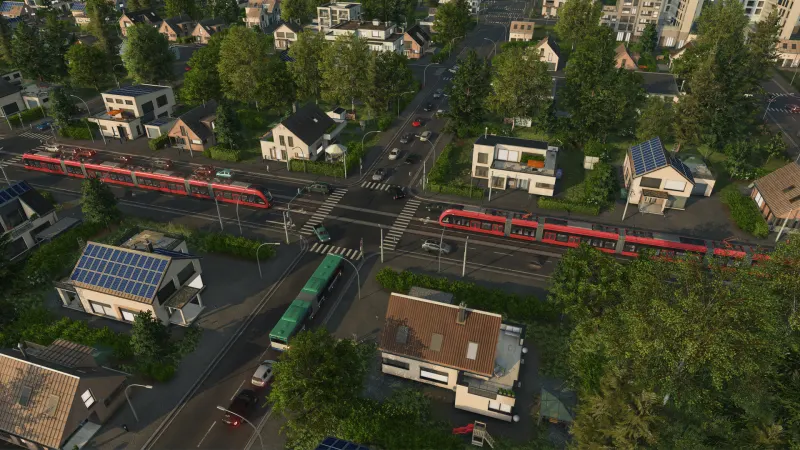
Placing one, and making it one-way
The mechanics above are official. The click-by-click steps below come from a third-party guide we could not verify inside the game, so treat them as a strong starting point rather than documented fact.
| Task | How, per the guide |
|---|---|
| Place a signal | Open the Tracks menu, switch to the tools tab, and click on a piece of track. |
| Make it one-way | Select the placed signal and switch its one-way setting on. The icon then reads as one white dot and two black dots. |
| What one-way is for | Turning a double-track line into two single-direction tracks, so nothing can enter a track against its direction. |
| Signal style over time | Semaphore signals up to 1950, light signals after that. |
Source: HowToVideoGame's signals guide, which states it is based on Urban Games' manual. We have not reproduced the menu navigation in-game ourselves.
If you are trying to give express services the right of way, there is a priority setting — and it is documented officially. From the same series of developer blogs: "Higher priority trains also have increased reservation distances on tracks, increasing the range at which signals will give them preference." In practice that means a high-priority line reserves further ahead, so signals clear for it earlier and a slower stopping service waits. It is the clean way to stop a commuter train from eating into an intercity timetable.
| Job | Where it comes from |
|---|---|
| Signals are path-based | Official dev blog, Episode 5 |
| Trains reserve past the next stop | Official dev blog, Episode 5 |
| Priority changes reservation distance | Official dev blog, Episode 3: Infrastructure |
| Menu navigation and the one-way toggle | Third-party guide, not verified in game |
| Signal models change in 1950 | Third-party guide, not verified in game |
Kept deliberately separate. The mechanics carry first-party wording; the click-by-click steps do not.
Setting priority in practice
The priority is a property of the line, not of the train, and you set it in the railway lines window — the setting surfaces in the bottom right corner of that panel, described in its own tooltip as reservation priority. You set it per service, so the decision you are actually making is which journey you want to protect when two services want the same piece of track.
- Set it on both lines, not just the one you want to favour. If you only raise the express, you have not created a distinction — you have removed one.
- Giving every line the same high priority deletes the mechanism. The useful signal is the difference between them.
- Watch two meetings, not one. The first encounter tells you which train moved aside; the second tells you whether the lower-priority train actually got moving again afterwards.
- Priority decides precedence. It cannot create track. If a line has no passing loop and no signal to wait at, no priority setting will rescue it.
The practical framing comes from a creator testing the release build: follow the next couple of signals to see how a priority decision plays out, but do not treat "two signals" as a rule about reservation distance — the official description is simply that higher-priority trains reserve further ahead.
Why this is a money problem, not just a puzzle
A train that is blocked earns nothing while still costing upkeep. That sentence is the whole argument for spending money on signals early. On a cargo line, a stalled train is also a delivery clock running out, and late deliveries damage the town's delivery rating even when they still pay.
The practical order for a new rail line is therefore: lay the track, run the line once to see where trains actually meet, then place signals at those meeting points. Signalling to a plan before you have watched the traffic is how you end up with signals in the wrong places and no idea why the line still jams.
The mistakes worth checking first
- A siding signalled at one end only. The train that enters from the unsignalled side does not know the loop exists.
- A train stopped across a switch. Its reservation covers the junction, so everything behind it waits — this is why short trains and long platforms matter more than they look.
- Expecting the station to sort things out. A platform is not a signal.
- Signalling after the fact on a line that already jams. Build, watch, then signal; the traffic tells you where the conflict is.
If you want the wider picture — which track types exist, what they cost to maintain, and how stations and depots fit together — that is on the infrastructure page. If the problem is that your cargo will not unload at all, that is a different mechanic entirely: stations no longer store cargo.
FAQ
What changed about signals in Transport Fever 3?
How far a train reserves. In Transport Fever 2 a train only reserved as far as the second-next signal or its next stop. In Transport Fever 3 it reserves past its next stop, up to a stop where it can change direction, or up to the next signal on the way. Urban Games says this makes the behaviour easier to understand, especially for newcomers.
Do I need signals at every station?
No. What you need is a signal wherever two trains are supposed to pass each other. Because the reservation now runs past the next stop, the practical version of that advice is: put signals at both ends of every passing siding, and at any place where a train could meet another head-on.
Are stations treated as signals?
No. A train's reserved path ends at the next signal, not at a platform. If you rely on a station to separate two trains, they will conflict.
What kind of signals are in the game?
Path-based signalling, the same family as the previous games — Urban Games describes it as signals turning green when an approaching train can reserve its own route up to the next signal. The official blog also contrasts this with block signals, where trains interfere with each other more readily.
How do I make a one-way signal?
Place a signal on the track and switch its one-way setting on. That is what turns a double-track line into two single-direction tracks. The steps for this come from a third-party guide rather than from the official site, so treat the exact menu wording as a strong hint rather than gospel.
Why are my trains sitting still?
The usual causes are a passing siding without signals at both ends, a train stopped across a switch, or a route with no signal at the point where two trains need to separate. Blocked trains also earn nothing while still costing upkeep, so a jam is an income problem as well as a puzzle.
Do signal models change over time?
Reported yes: semaphore signals up to 1950, light signals after. The official blog does confirm that signals adapt their appearance to context, for example when placed on a bridge or inside a tunnel.
Sources: Urban Games — Dev Blog Episode 5: Highlights (English), Urban Games — Dev Blog Episode 5: Highlights (German), HowToVideoGame — How to Use Train Signals, Steam Community — Transport Fever 3 discussions. Transport Fever 3 is a trademark of its respective owners.